
About this product
The Max Bank Script is an awesome Online Banking Script designed to suit all your online banking system requirements.
This bank script is packed with all the features you will need in a bank project.
Flexibility is required for software of this nature, and that is why we developed the Max Bank Script.
With this online bank application, a business can present it as a branded digital banking platform.
On the other hand, a developer can use the Max Bank Script source code as a starting point for a more specialized fintech web application.
How this Online Banking Script Works
After instalation which, the step-by-step installation guide is in the readme file that comes with this script.
The admin, from his dashboard, will set up the bank platform exactly the way he wants it.
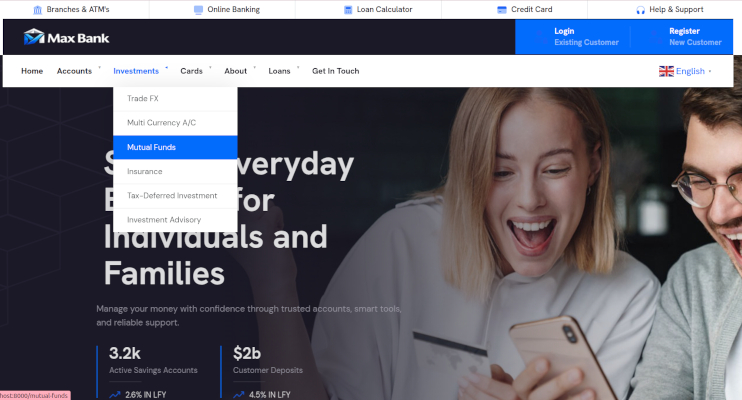
The script is a full CMS application; all information, images, and write-up on the front end can be edited from the admin dashboard, so they don't have to go into the code.
It comes with red and blue frontend colour variants, which the admin can choose from.
The email templates are also editable.
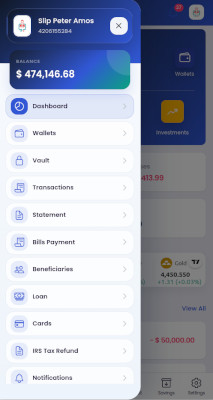
After setup is completed, it starts with registration. A new customer submits the required details, verifies access based on the admin-configured process, and signs in. After login authentication and authorization, an account PIN may be required if the admin set it to be so.
The customer dashboard displays the kind of information people look for first: accounts, balances, recent activity, pending actions, and useful shortcuts.
From there, users can update their profile, manage beneficiaries, review account statements, and initiate supported transfers or payment requests. Clear confirmation screens and notification hooks help make each step understandable.
The goal is not simply to display data; it is to make ordinary online banking tasks feel predictable and easy to follow.
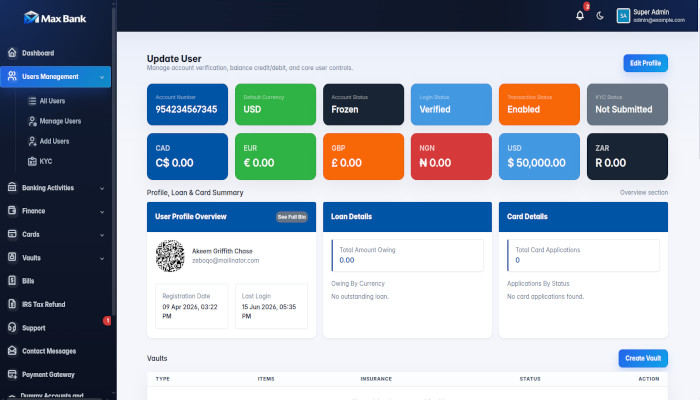
On the other side, the admin dashboard gives a central control of customer management, transactions, settings, reports etc.
Features of Max Bank Script
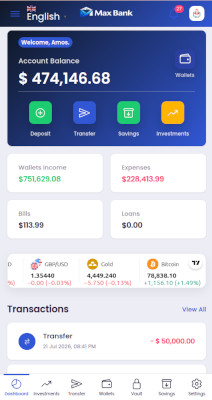
- Responsive design: The interface is very responsive on all screen display sizes; phones, tablets, and desktops.
- Secure login: Comes with secure sign-in security that gives customers a familiar, protected entry point to their accounts.
- Customer dashboard information: Users can see balances, account summaries, recent transactions, and key actions in one place.
- Admin management dashboard: Administrators receive an organized workspace for supervising the banking website script.
- Money transfers: The application supports transfer workflows with clear fields and confirmation steps.
- Transfer Code: Unlimited transfer codes can be generated by the admin to each user by email, OTP, or manually, to use for transaction completion.
- Investment: If the investment feature is enabled by the admin, every user can invest from their savings to earn interest; this makes this online bank script an investment banking platform.
- Frontend colour switch: The admin can switch the colour of the frontend to suit their preference.
- Inter-bank transfers: Move funds between eligible accounts within the same platform with less friction.
- External transfers: Configure workflows for transfers to approved external destinations and beneficiaries.
- Local and international transfer options: Accommodate different transfer types as the business model and integrations allow.
- Beneficiary management: Customers can save, review, and maintain recipient information for repeat payments.
- Transaction history: Searchable activity records help users understand where money moved and when.
- Account statements: Clear statements make it easier to review financial activity or support record-keeping needs.
- KYC workflow support: Capture and review verification information appropriate to the platform’s compliance process.
- Email notifications: Keep customers informed about account events, status changes, and important actions.
- Loan management: Present loan-related requests, status, and repayment information in an understandable format.
- Fixed-deposit support: Add structured views for savings or deposit products where they fit the service offering.
- Bill-payment workflows: Create convenient routes for supported bills and recurring customer obligations.
- Multi-currency: Build toward accounts and displays that serve customers operating across currencies.
- User management: Staff can review customer profiles and manage operational details from one location.
- Security settings: Give users sensible controls for passwords, sessions, and other account-access preferences.
- Two-factor authentication support: Extend sign-in protection with an additional verification step when configured.
- Profile management: Customers can maintain their contact details and personal account information.
- Easy customization: Adapt colors, logos, content, modules, and workflows to fit a distinct financial brand.
- SEO-friendly frontend: A structured public-facing experience gives your product pages a stronger search foundation.
Who Needs Max Bank Script?
- Software companies that need a configurable financial portal, and digital agencies serving finance-oriented clients.
- Entrepreneurs can use it to establish a polished product direction before investing in deeper bespoke development.
- It is also useful for web developers seeking banking software source code they can study and adapt.
- Financial institutions may use a customized version for internal demonstrations, customer-service portals, or supplemental digital products, subject to their own compliance, security, and regulatory obligations.
- Educational institutions and students can benefit from examining a realistic PHP banking application when learning how account, transaction, and administrative workflows connect.
Frequently Asked Questions
What is Max Bank Script?
Max Bank Script is a PHP-based online banking script that provides a foundation for customer accounts, dashboards, transaction workflows, administration, and branded digital finance experiences.
Is this PHP bank script suitable for a fintech startup?
Yes. It can be a practical starting point for a prototype, MVP, demo, or customized fintech web application, provided you plan proper security and compliance work for the intended use.
Can I customize the Max Bank Script branding?
Yes. Developers can adapt logos, colors, text, layouts, email content, and selected workflows so the online banking system aligns with a particular business identity.
Does the script work on mobile devices?
The responsive banking script is designed to provide a usable interface across common phone, tablet, and desktop screen sizes.
What technologies are used in the bank source code?
The stack uses PHP, MySQL, HTML5, CSS3, JavaScript, Bootstrap, and interactive browser technologies such as AJAX and jQuery.
Does Max Bank Script include an admin panel?
It includes an administrative area for managing users, reviewing activity, applying settings, and supporting operational workflows with appropriate permissions.
Is an online banking script secure by default?
Security depends on deployment and ongoing operations. Use HTTPS, strong access controls, updates, secure configuration, testing, monitoring, and professional review before processing real financial data.
Can students use this banking software source code to learn?
Yes. It can help students explore how user accounts, dashboards, transactions, databases, and role-based administration are organized in a practical web application.
How do I get started with Max Bank Script?
Review the product details, confirm that its features match your project, request a demo if available, and plan a safe staging installation before customization.